I was sitting in a hospital waiting room while someone I love was in for a scan. I knew I'd added the appointment to Health Flare, and I couldn't find it. I could make one from Quick Log, but once it scrolled out of recent entries it was gone from view, and I sat there wondering what questions I'd forgotten. I was thoroughly confused, and I'm the one who built it.
Health Flare 1.10.0 fixes that, and to do it, it moves things people use every day. After the update, the bottom bar reads Dashboard, Track, Care and Journal. It used to read Dashboard, Tracking, Meds, Meals, Journal and Sleep. It's the biggest change to the app since it shipped.
Why touch it at all
Honestly, the whole idea of moving the bar was overwhelming. It has far-reaching consequences, and it quietly says my design is the only right one. As a user, I find it frustrating to lose what I knew because someone else thought their idea was better. If I had less mobility, or worse vision, or a foggier memory, would I want to track my health in an app I couldn't trust to stay put?
Health Flare is supposed to get out of the way. On a bad day the job is to log the thing and put the phone down, and keeping track of symptoms, medication, pain, appointments, sleep, meals and blood pressure is already plenty of work. Every time an app moves a button, it charges that work to the person who learned where the button was. Someone in the middle of a flare, tired and foggy, shouldn't have to relearn anything. So our default answer to "should we move this?" is no.
But the old bar had a problem that leaving it alone couldn't fix. It was built for me originally, for where our health adventures were at the time. As time moves on and you learn new things, an app fills up fast. Sleep landed in the bar because another user told me sleep tracking would help, I'd already built it, and it had nowhere else to go. So the bar had six items and still couldn't reach everything. Appointments, Activity, Check-in history and Flare history all had screens, and nothing in the bar led to them. The only way into your appointments was a "See all" link on the Dashboard, and that only showed up once you had three or more coming up. With one appointment booked, the list of your appointments was a screen you couldn't get to. That's the screen I was looking for in the waiting room.
Six is also more than a bottom bar holds well. Material's guidance is three to five, and at large text sizes six labels don't fit. Large text isn't an edge case for us. The app has to work at 200%, and that has to be designed in, not patched on later.
So this one was needed and broken, not new and shiny. That's the first question we ask of any change: is it for the person using the app, or for us? A redesign that makes the app look more current, or makes a release feel bigger, fails that test. Screens people can't reach pass it.
Making the change actually serve people was far more work than changing the bar and walking away. And I could have done that.
Fix, addition, or move
Before anything ships, we sort it into one of three kinds.
- A fix makes something that was wrong work properly. It gets a line in the changelog.
- An addition is something new that doesn't disturb what's there. It can get a short highlight after the update.
- A move changes where an existing screen or button is, or what it does when tapped. If someone who used the app yesterday would look for it in the old place, it's a move.
A move doesn't ship without a guide that says what moved and where it went. If the guide isn't ready, the move waits behind a build flag, switched off in every release until it is. This isn't a guideline someone has to remember on release day. The release tooling checks every change for its kind, and a move with no guide fails the build.
The new bar took ten separate pieces of work: the sections, a way to turn features off, a customizable bar, backups that carry your layout, the update card, and the guide, among others. Everything that moved a screen went into the code switched off, one piece at a time, and the switch only came on once the guide was done.
Nothing gets between you and logging
So how do you tell someone the furniture moved without making them sit through a tour first? We started with what we wouldn't do. No popup when the app opens. Nothing laid over a log form. No badges, no red dots, no unread counts.
After the update there's one card at the top of the Dashboard. That's it.
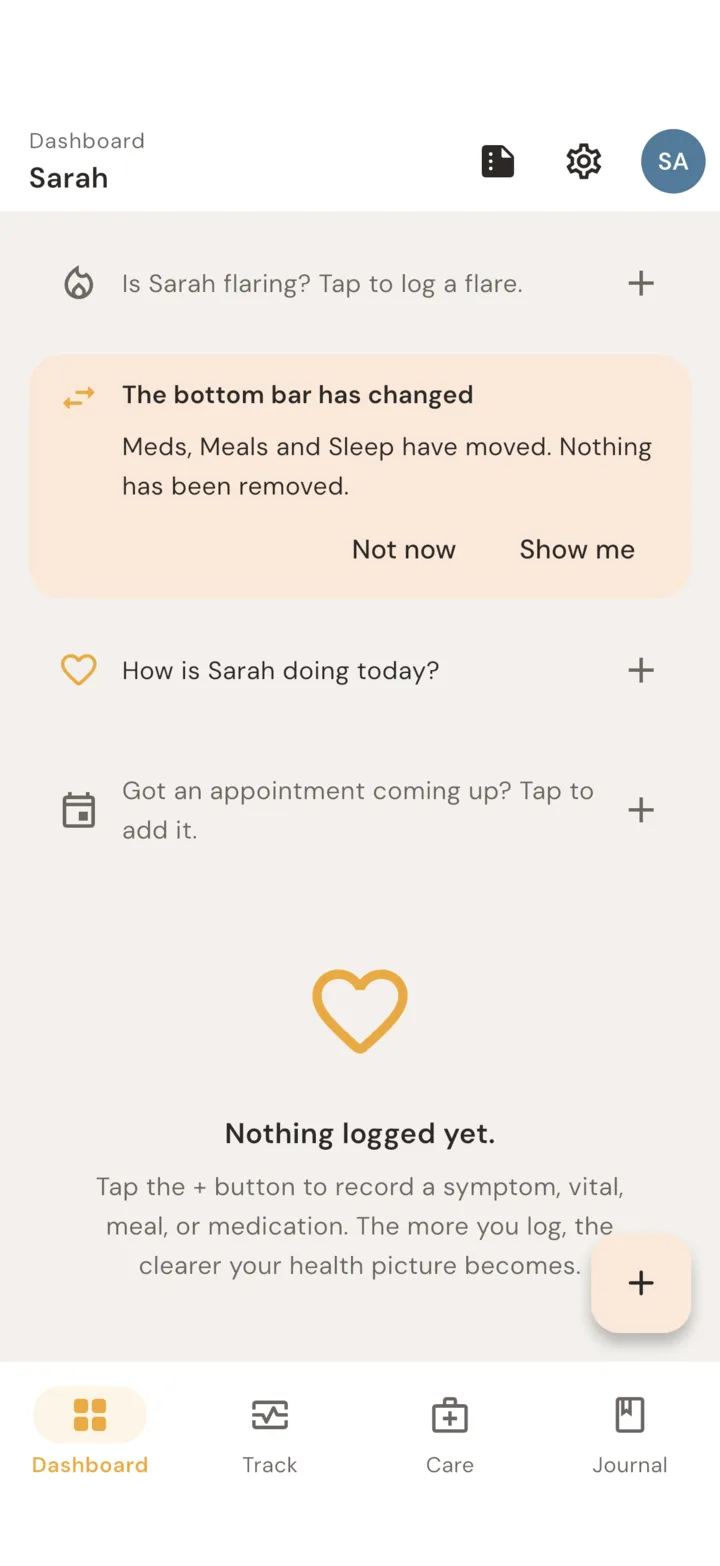
The card waits while a flare is active. If you put it off, it comes back once, and after that it's gone. The What's new card that follows it goes away for good when you dismiss it, open it, or ignore it for five app opens. If you'd rather never see these cards, "Show update highlights" in Settings turns them off, and off means off. Everything stays in Settings > What's new for whenever you want it.
The guide
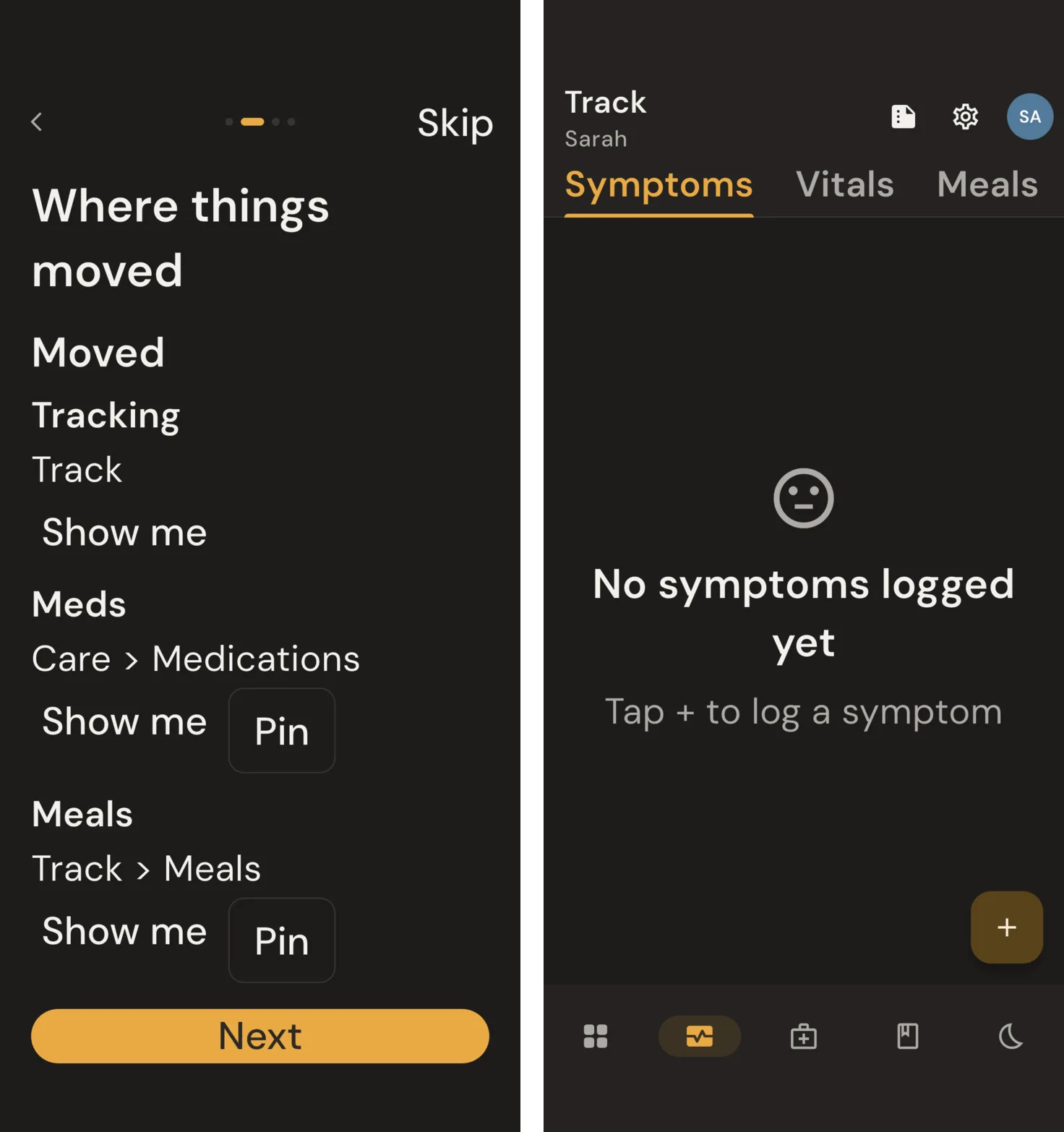
"Show me" opens a four-step guide. The first step shows the four sections and what lives in each.
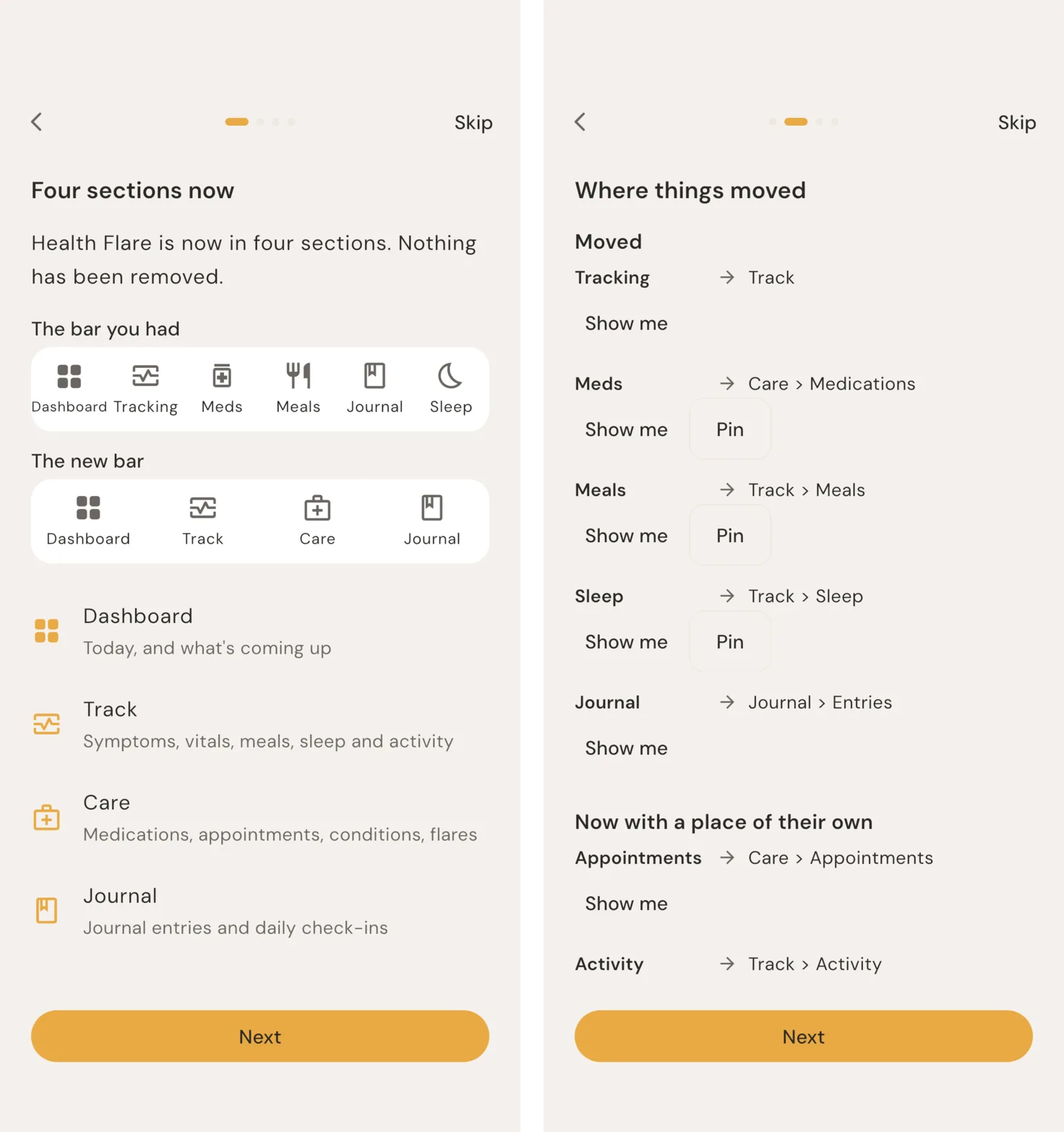
The second step lists every old name next to where it went, and each row has two buttons. "Show me" takes you to that screen with its place in the bar outlined, so you see the route instead of reading about it. "Pin" puts it back in your bar. If you opened Sleep from the bar every morning, one tap and it's there again, before you've finished the guide.
The third step asks whether you want to keep the new layout, put it back close to how it was, or set it up yourself. The last one tells you where to find the guide again, because you won't remember on the day you need it. Leaving the app halfway through doesn't count as finishing. The guide picks up where you left it.
Keeping the old way without keeping two apps
The obvious request is "let me keep the old layout". We said yes to the outcome and no to the obvious way of building it. A separate classic mode means every future layout change and every accessibility fix gets built twice, and the copy nobody's looking at quietly rots.
Instead, the bar is yours. Settings > Your layout > Bottom bar lets you pin any screen, three to five items, with More holding the rest. "Like before" is a preset that puts it back close to the old bar: Dashboard, Track, Medications, Meals and More. Close, not identical. The old bar had six items and the new one holds five, so Sleep lives in Track now, and the settings screen says exactly that. We'd rather say it plainly than pretend.
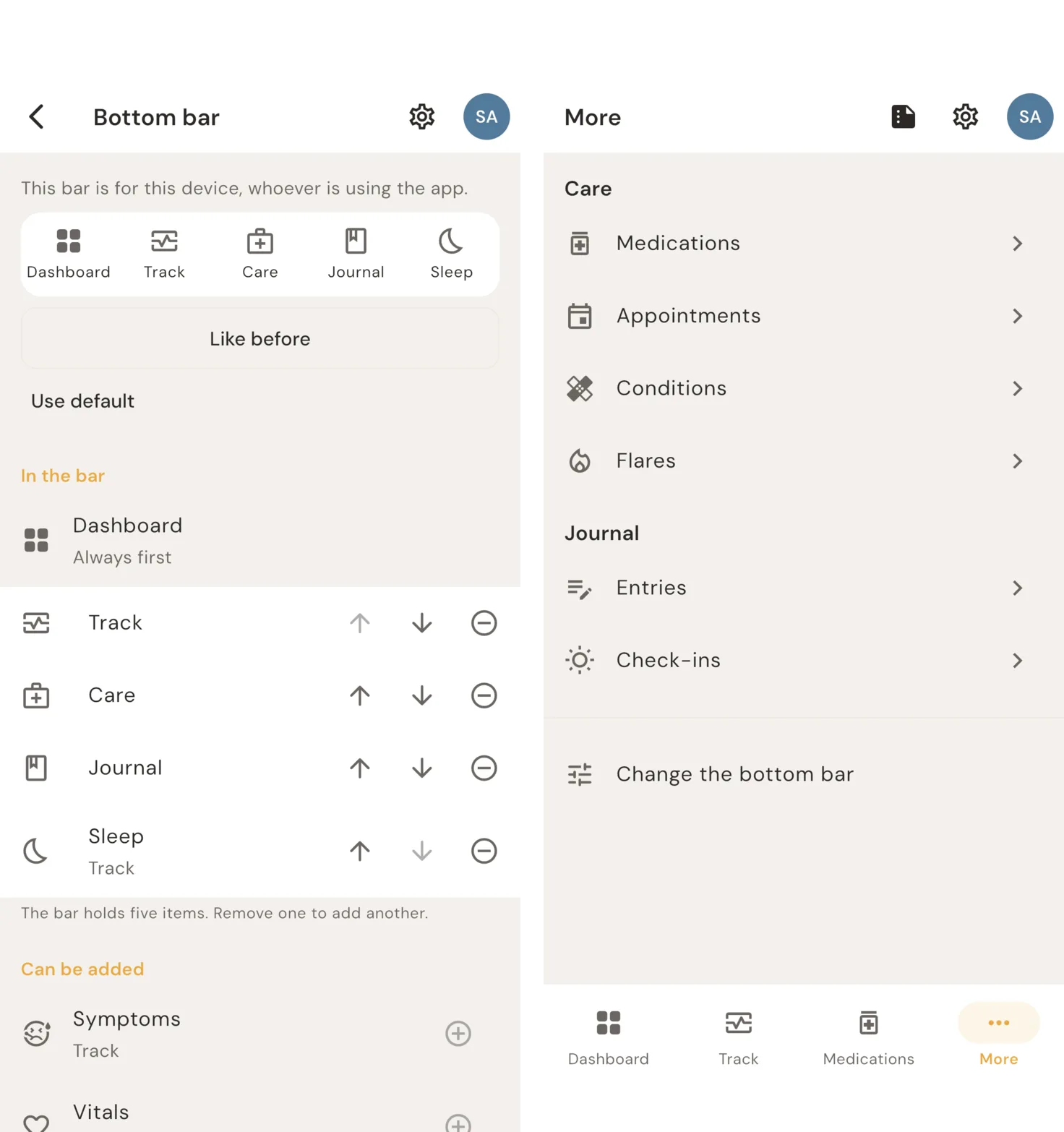
That choice only holds if it survives the next change too. Every section and tab now has a fixed id that never changes, even if its label does. If you set up your own bar, a future update keeps it as it is and tells you the default changed. It doesn't rearrange it for you. Your layout is part of your backups, so a new phone gets it back.
Turning off what you don't track
Not everyone logs meals. Not everyone needs Sleep. Settings > Your layout > Features in use lets each profile turn off what it doesn't use. The tab and the Dashboard card go away. Nothing you logged is deleted, and reports and exports still include it.
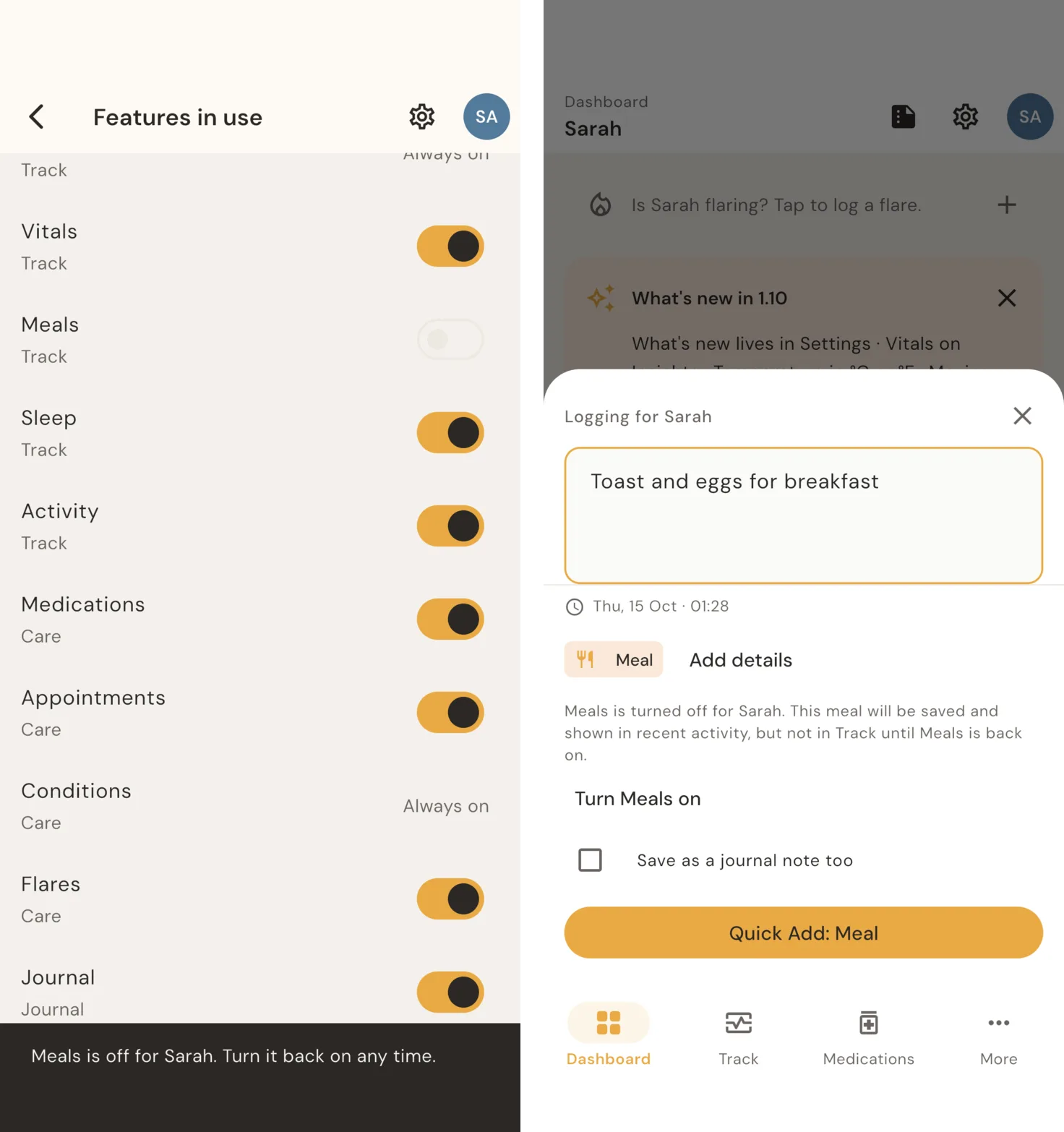
The part we cared most about is Quick Log. If Meals is off and you type "toast and eggs for breakfast", it still saves the meal, and says so before you tap: the meal will show in recent activity, but not in Track until Meals is back on. "Turn Meals on" is one tap away, and you can save it as a journal note too. Turning something off changes what the app offers you. It never changes what you can record.
What we cut
Moving the bar was already a lot to ask of people in one update, so we kept everything else in 1.10.0 small enough to not need explaining.
The clearest example: entries logged during a flare should attach to that flare, and right now they don't. The fix was close. But it changes what people see on every log form, and it needed its own explanation after the update. Shipping it alongside a new bar would have meant two things to relearn in one release, so it waits for the next one.
I'd rather say that out loud than leave it for someone to find. Being open and honest about what isn't fixed yet is how I live and how I work, and it's part of earning the trust of everyone using Health Flare, now and later.
The update card has a hard limit of four highlights. When a fifth thing wants in, something comes out. The rest is still listed under "All changes" for anyone who wants the detail.
Checking it the way people will meet it
Health Flare has no analytics. The guide is bundled in the app, and nothing reports whether you read it, skipped it, or pinned anything. That means we can't watch a dashboard after release to see whether the change landed. We chose not to know, so we have to get it right before it ships.
"Shipped" isn't the bar, then. The bar is that someone updating from 1.9.1 in the middle of a flare can still open the app and log what they need, with the + button on the Dashboard opening Quick Log the same as before.
To check that, one script walks the app from a 1.9.1 install through every new card and screen, in light and dark, at normal text and at 200%, on an iPhone and an Android phone, and screenshots each step. Looking through those found real problems before release. With very large text, "Skip" at the top of the setup steps broke into one letter per line. Chip labels on the symptom form and in Quick Log were showing in near-white in light mode. Both are fixed in 1.10.0.
The guide also works with a screen reader, respects Reduce Motion (no pulsing outline, no slides), and works with a keyboard on desktop. Under all of it, 1.10.0 updates how everyone's data is stored. Before it does, the app saves a safety copy on the phone, and the update is tested against a real database written by 1.9.1 itself, not one we made up to look like it.
How we'll keep doing it
The rules are written down, in the open, in how we release features. Fixes, additions and moves. No move without a guide. Nothing blocks logging. Dismissed means dismissed. Your setup survives updates. Off means off. Nothing phones home.
They'll cost us speed. Some things will sit behind a flag longer than we'd like, and some releases will be smaller than they could have been. That's the trade we'd rather make. The app is there for your harder days, and those are exactly the days it shouldn't surprise you.
As it turned out, I had no questions for that scan, and all was well. But the next time I'm sitting in that chair, my appointment will be under Care, my questions will be queued up on it, and I'll take the outcome notes and any medication changes as they happen. I'll have a better view of our insights, and a more useful conversation with our care providers.
Get it
1.10.0 is in review with Apple and Google now. Once it's approved, it will be on the App Store and Google Play, and the card and guide will be waiting on your Dashboard after you update. Everything else in this release, including vitals on Insights, °C or °F per profile, and an app lock, is in the changelog. If the new bar gets in your way, tell us what you were trying to reach. That's how the next default gets better.